| |
|
|
THE BUGS: WEIRD SCREENSHOTS
Source code modification by ...pyth
Weird screenshots ? Yes, sir, it's the present topic where you'll see that 32 bits seems to annoy our prefered video game ! Quite an important topic, most if you plan to expose your mods work to others as well as for gamers...
1) The fact
Let's just imagine that you're in a really cool situation in the game, for instance: you've got a killing screen as an Alien with total carnage that you'd like to immortalize. What about taking a screenshot for your friends, huh ?! Well, now imagine that you're damn happy to take it but wait... damn ! The image is in black'n white ! Arghh !!!
The thing appears if you're in a 32 bits per pixels video mode: all is trashed with bad lines and the stuff is totally black and white ! I experienced the problem on a Windows XP operating system in a 1024 x 768 X 32 screen resolution...
Here's a more explainable example:
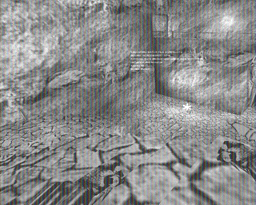 Quite disturbing, no ?!!! (This is the first Predator level... yes it is ;) )
2) Correction
In this part, we'll correct 2 things: the screenshot bug, plus another detail in the code (see the comments for that).
Now, just open the Scrshot.cpp file and locate the "Screenshot()" function. Full changed listing is below...
void ScreenShot()
{
char Name[40];
strcpy(Name,"AVP");
int length=strlen(Name);
strncpy(&Name[length],"00.bmp",8);
for(int i=0;i<100;i++)
{
Name[length]=i/10+'0';
Name[length+1]=(i%10)+'0';
FILE* tempfp=fopen(Name,"r");
if(!tempfp)break;
else
{
fclose(tempfp);
}
}
if(i==100) return;
FILE * fp = fopen(Name,"wb");
if (!fp)
{
return;
}
BMPHEADER2 h;
// fill out header
h.Header.Type = 'B'+'M'*256;
h.Header.Reserved1 = 0;
h.Header.Reserved2 = 0;
h.Header.Offset = 14+40+0;
/*
** The type of information found in a BMP structure is indicated by
** the Size (Information Headere Size) field with a non-zero value.
*/
h.PmInfo.Size = 0;
h.Pm2Info.Size = 0;
h.WinInfo.Size = 40;
h.WinInfo.Width = ScreenDescriptorBlock.SDB_Width;
h.WinInfo.Height = ScreenDescriptorBlock.SDB_Height;
h.WinInfo.Planes = 1;
h.WinInfo.BitCount = 24;
h.WinInfo.Compression = 0;
h.WinInfo.SizeImage = h.WinInfo.Width*h.WinInfo.Height*3;
h.WinInfo.XPelsPerMeter = h.WinInfo.Width;
h.WinInfo.YPelsPerMeter = h.WinInfo.Height;
h.WinInfo.ClrUsed = 0;
h.WinInfo.ClrImportant = 0;
// The filesize must be the sum of the image size & the header, so the 8 is a mistake...
// h.Header.FileSize = h.WinInfo.SizeImage + h.Header.Offset + 8;
h.Header.FileSize = h.WinInfo.SizeImage + h.Header.Offset;
// write header
PutWord_F PutWord = PutLittleWord;
PutDword_F PutDword = PutLittleDword;
PutWord(h.Header.Type, fp);
PutDword(h.Header.FileSize, fp);
PutWord(h.Header.Reserved1, fp);
PutWord(h.Header.Reserved2, fp);
PutDword(h.Header.Offset, fp);
PutDword(h.WinInfo.Size, fp);
PutDword(h.WinInfo.Width, fp);
PutDword(h.WinInfo.Height, fp);
PutWord(h.WinInfo.Planes, fp);
PutWord(h.WinInfo.BitCount, fp);
PutDword(h.WinInfo.Compression, fp);
PutDword(h.WinInfo.SizeImage, fp);
PutDword(h.WinInfo.XPelsPerMeter, fp);
PutDword(h.WinInfo.YPelsPerMeter, fp);
PutDword(h.WinInfo.ClrUsed, fp);
PutDword(h.WinInfo.ClrImportant, fp);
int red_shift,red_scale,green_shift,green_scale,blue_shift,blue_scale;
// We adjust color scales for highter video modes too...
// if(VideoModeTypeScreen==VideoModeType_15)
if((VideoModeTypeScreen==VideoModeType_15) || (VideoModeTypeScreen==VideoModeType_24))
{
int m;
for (red_shift = 0, m = DisplayPixelFormat.dwRBitMask;
!(m & 1); red_shift++, m >>= 1);
red_scale=255/m;
for (green_shift = 0, m = DisplayPixelFormat.dwGBitMask;
!(m & 1); green_shift++, m >>= 1);
green_scale=255/m;
for (blue_shift = 0, m = DisplayPixelFormat.dwBBitMask;
!(m & 1); blue_shift++, m >>= 1);
blue_scale=255/m;
}
// Fix for screenshots taken in 32 bit display mode.
// We need the number of bytes per pixel, which may not be 4.
DWORD dwBytesPerPixel;
if ( VideoModeTypeScreen == VideoModeType_24 )
{
dwBytesPerPixel = DisplayPixelFormat.dwRGBBitCount >> 3;
}
// write 24 bit image
LockSurfaceAndGetBufferPointer();
unsigned char* BufferPtr=ScreenBuffer+BackBufferPitch*(h.WinInfo.Height-1);
for (i=h.WinInfo.Height-1; i>=0; --i)
{
int j;
if(VideoModeTypeScreen==VideoModeType_8)
{
for (j=0; j<h.WinInfo.Width; ++j)
{
PutByte((BYTE)TestPalette[BufferPtr[j]*3+2]<<2,fp); //b
PutByte((BYTE)TestPalette[BufferPtr[j]*3+1]<<2,fp); //g
PutByte((BYTE)TestPalette[BufferPtr[j]*3]<<2,fp); //r
}
}
else if(VideoModeTypeScreen==VideoModeType_15)
{
short colour;
for (j=0; j<h.WinInfo.Width; ++j)
{
colour=*(short*)&BufferPtr[j*2];
PutByte((BYTE)(((colour & DisplayPixelFormat.dwBBitMask)>>blue_shift)*blue_scale),fp); //b
PutByte((BYTE)(((colour & DisplayPixelFormat.dwGBitMask)>>green_shift)*green_scale),fp); //g
PutByte((BYTE)(((colour & DisplayPixelFormat.dwRBitMask)>>red_shift)*red_scale),fp); //r
}
}
else if(VideoModeTypeScreen==VideoModeType_24)
{
// We need more elaborate colours here...
/* for (j=0; j<h.WinInfo.Width; ++j)
{
PutByte((BYTE)BufferPtr[j*3+2],fp); //b
PutByte((BYTE)BufferPtr[j*3+1],fp); //g
PutByte((BYTE)BufferPtr[j*3],fp); //r
}*/
// ... so we calculate each new RGB values
DWORD colour;
for ( j = 0; j < h.WinInfo.Width; ++j )
{
colour = *(DWORD*)&BufferPtr [j*dwBytesPerPixel];
PutByte ((BYTE)(((colour & DisplayPixelFormat.dwBBitMask)>>blue_shift)*blue_scale),fp); // b
PutByte ((BYTE)(((colour & DisplayPixelFormat.dwGBitMask)>>green_shift)*green_scale),fp); // g
PutByte ((BYTE)(((colour & DisplayPixelFormat.dwRBitMask)>>red_shift)*red_scale),fp); // r
}
}
// pad to 4 byte boundary
for (j=~(h.WinInfo.Width*3-1) & 3; j; --j) PutByte(0,fp);
BufferPtr-=BackBufferPitch;
}
UnlockSurface();
fclose(fp);
}
That's it ! Now the stuff should be ok, thanks pyth for the code !
|